SD Offload — Insert a Card, Walk Away, and Actually Trust the Wipe
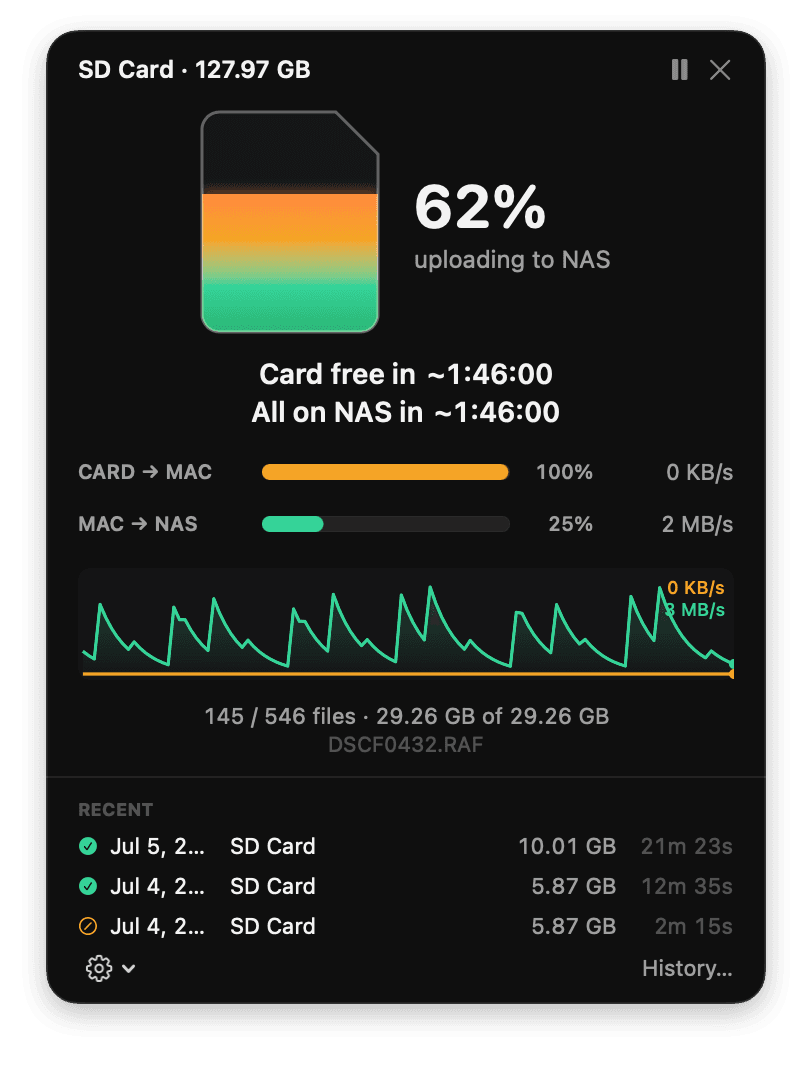
Every shoot ended the same way for me. Pull the card, drag the files to the NAS in Finder, watch a progress bar I don’t trust, and then hit the one decision in photography I hate: is it actually safe to format this card yet? Finder said it copied. But did every byte land on the server? Did that last 60 MB RAF really finish? I never knew, so I did what everyone does — kept a pile of full cards “just in case,” and formatted the oldest ones while quietly hoping.
SD Offload is my fix for that. It’s a native macOS menu-bar app that watches for a card, copies everything to the NAS, verifies each file end-to-end with SHA-256, and then — only then — erases the card. If a single file can’t be proven safe, the card is left completely untouched. Insert a card, walk away, come back to an empty card and a NAS full of verified photos sorted by the day you shot them.
How it works
Two pipelined hops with a verify at each end, and a strict all-or-nothing gate before anything gets deleted:
- Card → local staging SSD. A chunked copy with SHA-256 computed inline on the first read — the read off the card is the canonical hash — then a read-back verify straight off the disk (not the OS cache).
- Staging → NAS. Each file is promoted the moment it staging-verifies, so wall-clock is roughly
max(card read, NAS write)instead of the sum. Files land in plainYYYY/MM/DD/folders by EXIF capture date. Then the NAS copy is read back and its hash compared to the original card-read hash. True end-to-end integrity. - The wipe gate. The card is erased only when every file is verified on the NAS, nothing failed, the share is healthy right now, and each file on the card re-checks unchanged. Then it unmounts, ejects, and tells you it’s safe to remove.
If anything goes sideways — a crash, a yanked card, the NAS dropping off mid-transfer — a crash-safe journal resumes exactly where it left off, and a mismatched file re-copies once, then fails rather than lying to you. A failed file means the wipe never runs. The card is always the safety copy until the bytes are provably somewhere else.
The bug that made me trust it
Here’s the detail I’m most proud of catching, because it’s the kind of thing that quietly defeats the entire point of a tool like this.
The final “read the file back off the NAS and compare the hash” check was, at first, a cached read. Over SMB, fsync flushes your bytes to the server — but it does not invalidate the client’s read cache. So a normal read-back can happily re-hash the very bytes you just wrote, straight out of local memory, and “pass” without the request ever touching the server. Your verification is verifying your own RAM. And then it wipes the card.
The fix is one flag — force the read uncached (F_NOCACHE) so it’s a genuine round-trip to the server — but the lesson is bigger: for a program that deletes originals, faster wrong verification is worse than slower right verification. Every wipe-gating read is now uncached, always, and there’s no setting to make it otherwise.
Beyond the copy
Once the photos are safely on the NAS, SD Offload doubles as a browser for the archive — no launching Finder or Preview.
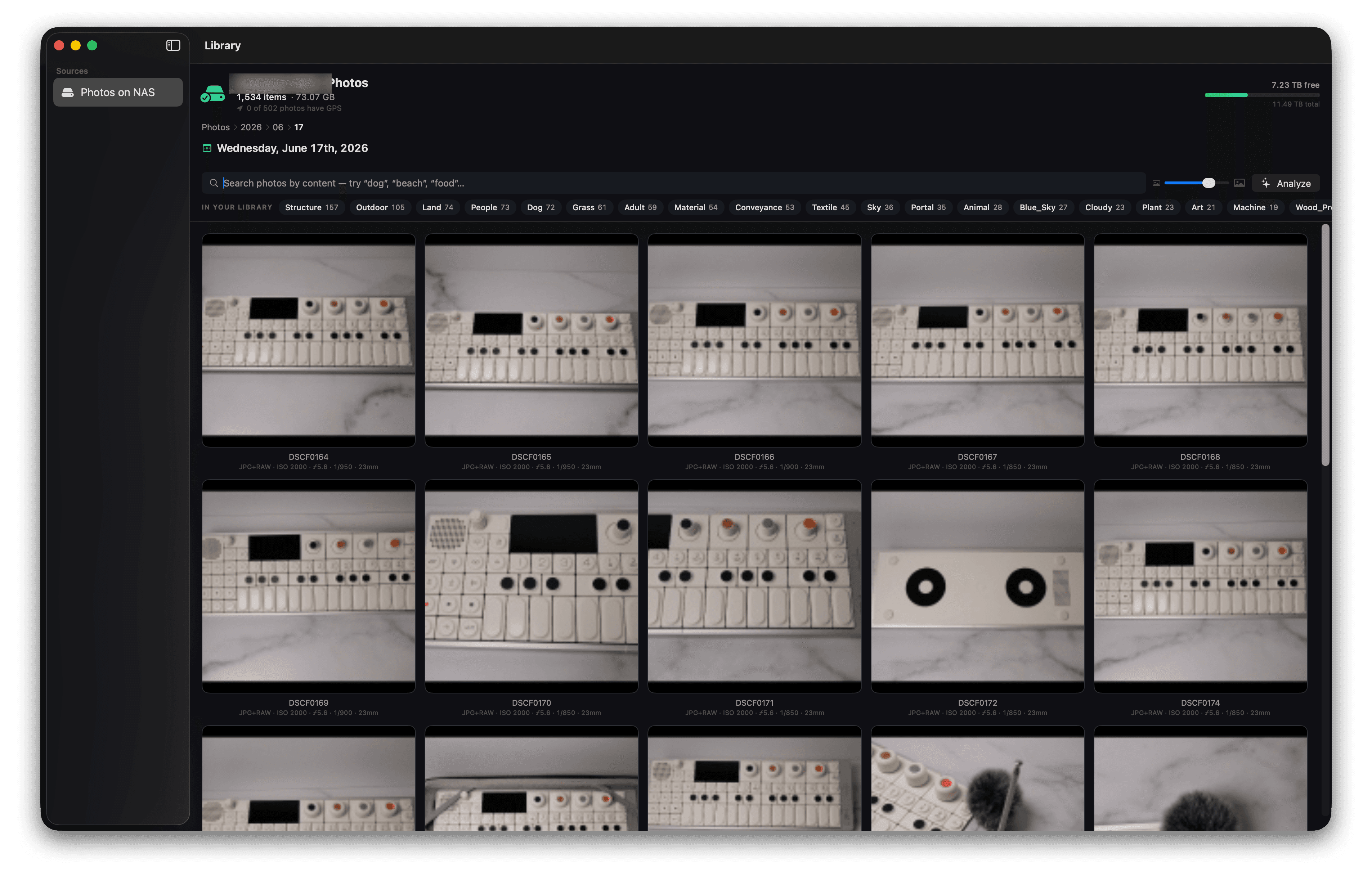
- A fast Library. Date-folder navigation, a storage gauge, and thumbnails that pull each file’s embedded preview — kilobytes over SMB instead of downloading a 50 MB RAW to decode it. Date folders render as little photo collages so you can see what a day holds at a glance.
- An in-app viewer that opens instantly, pairs RAW+JPEG into one photo, and packs an info inspector with camera, lens, exposure, dimensions, GPS, and content tags.
- On-device search. Apple Vision — running on the Neural Engine, no cloud, no API keys, no accounts — tags what’s in each photo so you can search “beach”, “dog”, “food”.
- Named faces & pets. Detect faces and pets, then name them (“Elizabeth”, “Hurley”); it learns from every label and folds the names into search. Honest caveat: the v1 grouping is a starting point you confirm, never an auto-label — and every face template stays in a local, owner-only file that’s excluded from backups and cloud sync, behind a one-time consent, with a one-click “delete all face data.” Biometric data is not something to be casual about.
Two copies before the wipe, and stacking cards
Two features I added specifically because this tool erases things:
A second verified copy. Point it at a second local or external drive and every photo is mirrored there and read back too. A file doesn’t become eligible for the wipe until it’s confirmed on both the NAS and the second drive — so an automatic wipe can never leave you with a single copy. The elegant part is that the wipe gate didn’t change at all; a file just can’t reach the “safe” state until both destinations verify.
Auto-queue. Insert a card while one’s already offloading and it’s queued and started automatically when the current one finishes. Stack a few readers and genuinely walk away.
And despite the name, it isn’t SD-only — detection keys off “removable volume with a camera folder,” so CFexpress, CF, microSD, or any drive with a DCIM works.
Under the hood
Native Swift 6 / SwiftUI, built with Swift Package Manager, zero external dependencies — just Apple system frameworks. Swift actors throughout for the journal, NAS locator, staging budget, and pipeline. CryptoKit SHA-256 (the ARMv8 SHA-2 instructions make it free), raw-fd chunked I/O, DiskArbitration for card detection, a statfs ghost-mount guard so it never writes into a leftover local folder when the share is actually gone, ImageIO and Vision for the imaging and AI.
The part I insisted on: the wipe path is covered by 73 unit tests plus a full integration harness that drives a real offload against a fake card and a stand-in NAS, and asserts the safety property in every failure mode — NAS drops out mid-upload, one file fails, crash-and-resume, a wrong card on a colliding volume ID, and the second-drive copy failing. If any of those could wipe a card it shouldn’t, the tests fail. It never touches real hardware to prove it.
It’s open-source and lives on GitHub: t0nyz0/SD-Offload. It’s a personal tool, ad-hoc signed and built from source — so you can read the destructive path yourself before you trust it with a real card. That’s rather the point.
Built with Swift, SwiftUI, CryptoKit, Apple Vision, and a healthy fear of formatting the wrong card. Runs entirely on your Mac and your LAN.