BambuBoard 3.0 — Back to a Single Printer, Built for Streamers
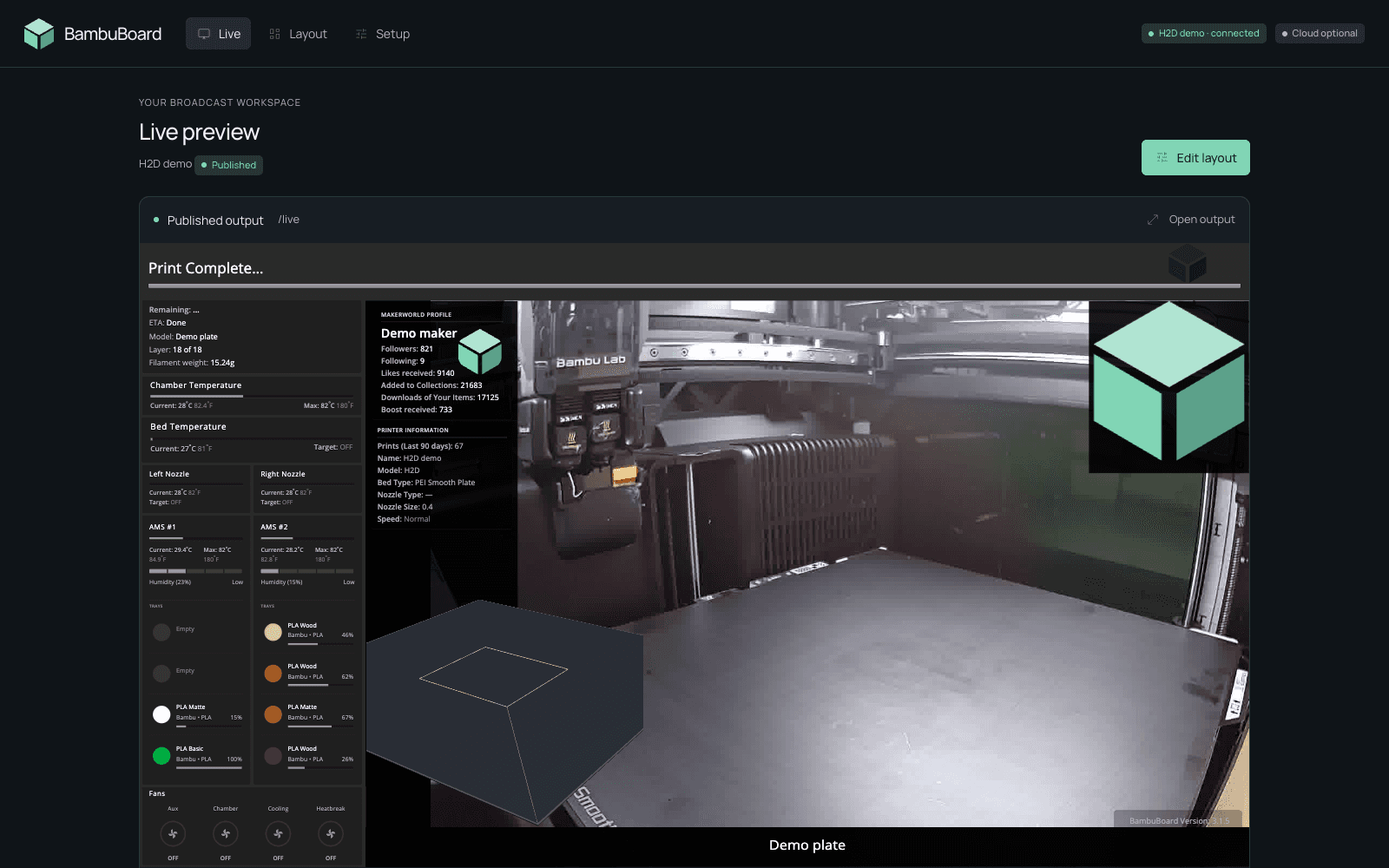
I started BambuBoard as a dashboard for OBS browser-source widgets. v2 grew teeth over time. Multi-printer fleet management, the works. Useful, but a different product than what most folks actually wanted: stream a print, look slick on camera, done. v3.0 throws out the multi-printer scaffolding and rebuilds around that single use case.
The screenshot above previews the Studio refresh in an isolated demo installation, using a recorded feed from my H2D and sample telemetry, cloud responses and gcode. The live preview comes first, with OBS setup below it and optional YouTube streaming at the bottom. The camera and widgets are still composited into a single /live page that OBS captures with one Browser Source. No plugins, no proprietary integrations, runs fully on your LAN.
Why a v3 instead of patching v2
A few honest reasons.
Multi-printer was solving a different problem. People with print farms have other tools. (And quite frankly, they’ve already built spreadsheets.) The audience I kept hearing from was streamers and one-printer makers who wanted a clean dashboard.
v2 didn’t have a layout editor. You hand-edited the OBS scene JSON. That’s brutal.
The MQTT/widget architecture was solid, but the UX around it had drifted. Five different settings panels, three places to put your access code, no auto-detection of printer model. Time to compress.
What BambuBoard does
A complete tour of features. Items that are new in 3.0 are flagged.
Printer & telemetry
- Auto-detected printer model (new in 3.0). MQTT tells us if you have an X1C, X1, X1E, P1P, P1S, P2S, A1, A1 Mini, or H2D (plus mapped variants like H2D Pro, H2C, H2S, and X2D). The widget set, capability gates, and default scene template all adapt automatically. Detection logic mirrors ha-bambulab.
- LAN-only operation. Fully functional with zero cloud dependency. All assets bundled locally; no CDN calls at runtime.
- MQTT 8883 over TLS with the printer’s LAN access code. Same connection model as Bambu Studio’s LAN-only mode.
- Bambu Cloud auth (optional). Sign in via paste-token (Cloudflare-resilient) or email + verification code to populate the MakerWorld profile and live model-image widgets. Tokens cache for one year in
data/accessToken.json.
OBS browser-source widgets
A pile of small, themable HTML widgets you add as Browser Sources in OBS. Every widget supports ?theme=dark|light|transparent, ?accent=#hex, ?fontSize=, ?title=, and ?pad= query-string customization.
- Bed temperature. Current/target/bar.
- Chamber temperature. Cap-gated to X1, X1C, H2D, and P2S.
- Nozzle temperature. Current/target/bar. Use
?nozzle=0(right) or?nozzle=1(left) on dual-nozzle printers. - Nozzle info. Type, size, current speed level.
- AMS card (combined in 3.0). Chamber temp, humidity, drying status, and four tray rows in a single card. Supports up to 4 chained AMS units via
?ams=0|1|2|3. - AMS drying indicator. AMS 2 Pro and AMS HT units get a live “DRYING · 60° · 11h” pill with an animated fan icon when actively heating filament. Older AMS / AMS Lite always reports zero so the indicator stays hidden, no model gating needed.
- Active tray highlight (new in 3.0). Currently-feeding filament tray gets a green left-edge accent and soft tint while printing.
- Active nozzle highlight (new in 3.0). Currently-extruding nozzle gets the same treatment on dual-nozzle printers.
- Fans. All four fan speeds with animated spinning icons and circular gauge rings.
- Print progress. Bar with status text and percentage.
- Print info. Total prints, model name, weight, nozzle/bed types.
- Printer info. Name, model, serial, IP.
- MakerWorld profile. Followers, downloads, and stats (requires Bambu Cloud auth).
- Model image. Preview of the current print (requires Bambu Cloud auth).
- Notes / footer. Auto-updates with the model name each print, manually overridable.
- Wi-Fi signal. Wireless strength indicator.
- Version stamp. Small corner badge.
- Live gcode toolpath (new in 3.0, beta). The big one. Three.js widget that fetches the active print’s gcode over FTPS, parses it, and renders the toolpath in real time with a stylized hotend tracing exactly where the printer is. Multi-color prints get per-tool AMS colors. Adaptive speed calibration keeps the simulated nozzle locked to the printer’s reported
mc_percenteven through filament swaps. - Live camera (new in 3.1). Renders the printer’s chamber camera directly in the browser — no OBS media source, no SDP file, no Bambu Studio. Auto-selects transport per model: RTSP for X1/X1C/H2D/P2S (enable LAN Mode Liveview once on the touchscreen), and the port-6000 chamber-image protocol for P1/A1-class. Not cap-gated — works on every supported printer.
Scene editor (all new in 3.0)
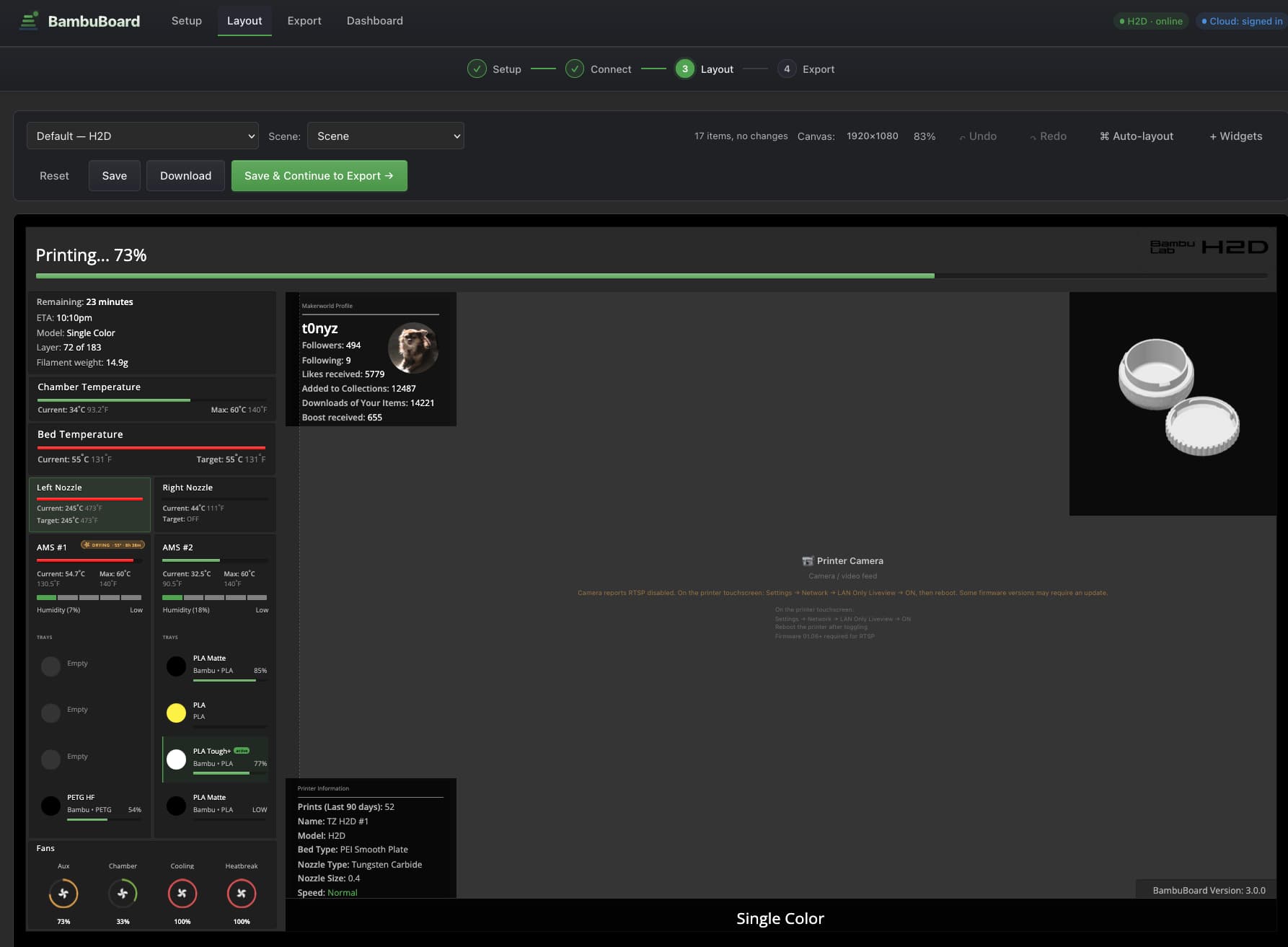
The thing I built and used the most this cycle.
- Drag widgets from a side drawer onto a 1080p or 2K canvas.
- Snap to grid, multi-select, undo/redo (Cmd+Z / Cmd+Shift+Z).
- Resize via corner handles or the inspector. Move via drag or arrow keys.
- Live previews driven by your real telemetry, not mocks.
- OBS-style Layers panel. Drag rows to reorder z-stacking, click eye/lock per row, see your full source stack at a glance. Mirrors the OBS Sources dock.
- Per-widget theming. Inspector exposes title, theme, accent color, font size, and padding overrides per widget, baked into the exported scene’s URL params.
- Auto-size to content. A widget can postMessage its measured natural size back; one button resizes the OBS source to match.
- Telemetry bindings (advanced). Power-user feature: bind any widget parameter to a custom JSONPath into
data.jsonso you can target a 5th AMS unit or a custom firmware field without forking the widget.
OBS: one Browser Source (reworked in 3.1)
3.0 exported a multi-source OBS scene collection you imported. 3.1 throws that out. BambuBoard now composites the camera and every widget into a single page at /live, and OBS shows it via one Browser Source pointed at http://<your-host>:8080/live. No per-widget import, no camera media source.
- Publish model. Click 🔴 Go Live in the editor — it saves your layout and publishes it (
POST /api/obs/active)./livepicks up the change within ~4s, so re-publishing updates OBS with no re-import. - Two ways to wire OBS. Either paste the
/liveURL into a new Browser Source by hand, or use the one-click Download OBS scene (bambuboard-live.json) — a minimal collection containing exactly that one source. - Starter layouts, not downloads. The shipped templates (X1 family at 1080p; the H2D ships both a 1080p and a 2K starter) are now just editor starting points auto-loaded for your printer, and what
/livefalls back to before you publish — they’re no longer OBS import files.
Built-in camera — every model (new in 3.1)
The camera used to be an OBS Media Source you configured with a Bambu Studio SDP file. That’s gone. BambuBoard now streams the chamber camera itself, connecting directly with your LAN access code — the same way the ha-bambulab Home Assistant integration does.
- X1 / X1C / H2D / P2S use the RTSP stream (the server relays it via ffmpeg to a WebSocket the widget decodes with JSMpeg). One-time step: enable LAN Mode Liveview on the printer’s touchscreen.
- P1 / A1-class printers have no RTSP; they use the port-6000 chamber-image protocol (a
bblp+ access-code handshake, served as multipart MJPEG). No toggle needed.
The widget picks the right transport automatically, so the camera now works on every supported printer — no OBS, no Bambu Studio.
Stream to YouTube, no OBS (new in 3.1, beta)
The Live page can push /live straight to YouTube. Paste your stream key, and the browser captures + encodes the tab while the server relays it to RTMP via ffmpeg. It’s beta — OBS is still the better path on weak hardware, since the encoding happens in the browser.
Deployment
- Multi-arch Docker image on GHCR (
amd64/arm64). Works on x86 desktops, Apple Silicon, Raspberry Pi, Synology NAS. - One-line Synology install / update script. Auto-elevates to sudo, host networking, persistent settings volume.
docker-compose.ymlanddocker-compose.synology.ymlfor the compose-flavored crowd.- From-source install.
git clone,npm install,npm start. Node 20 (the Docker image shipsnode:20-alpine).
The four-step setup flow (new in 3.0)
The app guides you through this on first run. Here’s the shape of it.
1. Setup
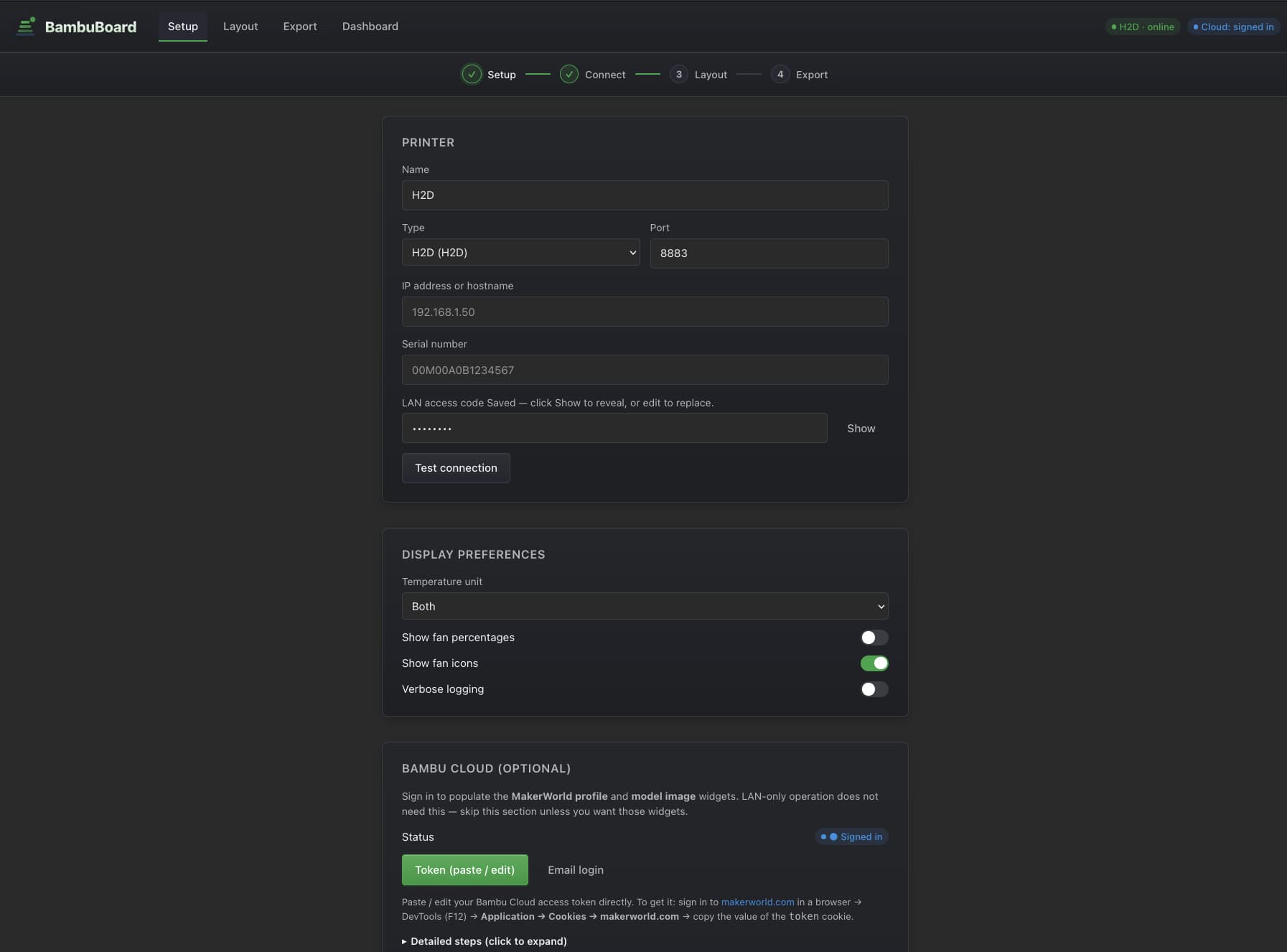
Enter your printer’s IP, serial number, and LAN access code. You can grab those from the printer’s screen (Settings → Network / Device Info) or Bambu Studio’s Device tab. Hit “Test connection” before saving.
2. Connect
Same page, lower section. BambuBoard asks the printer to identify itself via MQTT. Within 3–5 seconds you’ll see “Auto-detected: H2D” (or X1C, P1S, A1, whichever) and the “Continue to Layout →” button lights up.
3. Layout (the scene editor)
A 1920×1080 canvas (or 2560×1440 for the H2D template) auto-loads the matching default scene for your printer type. Drag widgets, resize, change themes, snap to grid. The Layers panel on the left mirrors OBS’s Sources dock.
When you’re happy, click 🔴 Go Live (the editor auto-saves and publishes). You can hit Preview first to open /live in a new tab and check it.
4. Go Live
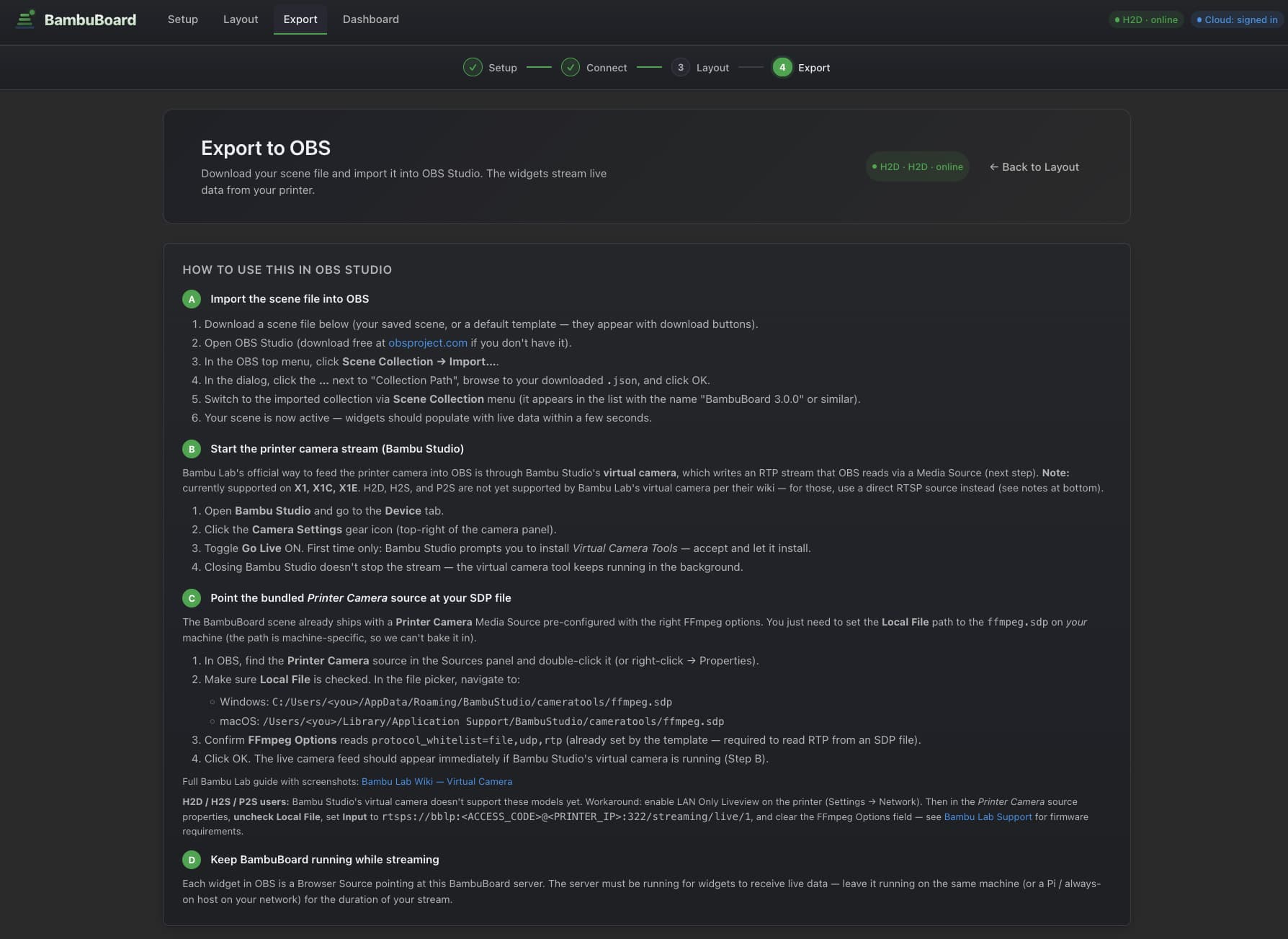
Add one Browser Source in OBS pointed at http://<your-host>:8080/live — that’s the whole scene, camera included. Prefer importing? Use the one-click Download OBS scene and Scene Collection → Import…; it’s still just that single source. Re-publishing from the editor updates OBS automatically, no re-import.
Match your OBS canvas to the layout. Set OBS → Settings → Video → Base (Canvas) Resolution to your layout’s canvas size — the H2D ships both 1080p and 2K starters; the X1 family is 1080p. If they don’t match, OBS will scale or crop the page.
The gcode toolpath widget
Most printer dashboards show telemetry. Temps, percentages, layers. Never the actual toolpath. That always felt like the obvious missing piece. v3 has it.
When a print starts, the widget hits a new backend route that:
- Reads the current job from the MQTT snapshot (
task_id,subtask_name,plate_idx). - FTPS-fetches
/cache/<subtask_name>.gcode.3mffrom the printer (port 990, implicit TLS, userbblp, password = LAN access code). - Unzips
Metadata/plate_<plate_idx>.gcodein memory and caches it underdata/gcode-cache/. - Streams the raw gcode back to the browser.
The browser-side widget parses every G0/G1/G2/G3 segment, tracks tool changes (T0/T1/M620), and renders the toolpath in three.js with a stylized hotend tracing the active layer. Multi-color prints get the correct AMS tray colors per segment. There’s an adaptive speed calibration loop that watches how fast mc_percent advances in wall-clock time and continuously corrects the simulation rate. That’s what keeps the simulated nozzle locked to the printer’s actual position even through filament swaps that take 30–60 seconds of real time but are nearly instant in gcode.
It’s still beta. Single-color prints track well; multi-object timing on really complex prints can still drift, but the adaptive speed calibration now keeps the sim locked to the printer’s reported mc_percent through filament swaps, and the mid-print sub-stage edge cases (nozzle cleaning, first-layer inspection) are handled now. There’s also a built-in ?debug=1 live event log for diagnosing the odd stuck-loading report. And watching the trail extrude red-hot and fade through orange/yellow/green to filament color is genuinely satisfying.
Setup — Docker (recommended)
docker run -d --name bambuboard -p 8080:8080 \
  -v $(pwd)/data:/usr/src/app/data \
  ghcr.io/t0nyz0/bambuboard:latest
Open http://localhost:8080. The setup wizard auto-loads.
Setup — Synology NAS
Synology’s Docker socket is root-only and the printer needs host networking for MQTT/RTSP. There’s a one-line update script that handles all of it.
curl -O https://raw.githubusercontent.com/t0nyz0/BambuBoard/main/update-synology.sh
chmod +x update-synology.sh
./update-synology.sh
Auto-elevates to sudo, pulls the latest image, restarts the container with --network host, and persists settings in ~/bambuboard-data/. Run it again any time to update; your config carries over.
Setup — from source
git clone https://github.com/t0nyz0/BambuBoard.git
cd BambuBoard
npm install
npm start
Migrating from v2
⚠️ Multi-printer users, read this first.
v3 is intentionally single-printer. If you upgrade from v2 with a
printers[]array, the first printer is kept and the rest are dropped with a warning. Aconfig.json.pre-merge-*-{timestamp}.bakbackup is written before anything is overwritten. If you genuinely need multi-printer, stay on v2: use the v2.0.1 release or pullghcr.io/t0nyz0/bambuboard:2.0.1.
The v1.x to v3 migration just works. Your printer config moves into the new shape automatically, your access token survives, and your custom OBS scene (if any) is untouched.
What’s next
Two of the three things that were “next” in 3.0 shipped in 3.1 — the native camera widget and per-tool color rendering (multi-color prints now color each segment from the gcode’s own T0/T1/T2 tool changes, no MQTT active-object needed). What’s actually left:
- Validate YouTube streaming against a real ingest. The browser-capture → ffmpeg → RTMP relay is verified end-to-end on the server side; it still needs confirmation against a live YouTube broadcast on real hardware.
- Confirm the P1 / A1 camera on real hardware. The port-6000 chamber-image path is implemented from ha-bambulab’s protocol and verified for the RTSP models; it needs a real P1/A1 to confirm end-to-end.
- More printer testing. I personally test against the X1C and H2D. Every other model in the supported list is “should work” via ported ha-bambulab logic. If you’ve got a P1P, P1S, P2S, A1, A1 Mini, X1, or X1E and you spot something off, please open an issue with a screenshot plus the relevant chunk of
localhost:8080/data.json. Triage takes 10× longer without one.
Project lives at github.com/t0nyz0/BambuBoard under MIT, contributions welcome. The old v1.x article is still up if you’re on a really old install, but you should probably just upgrade.